
Carrying your Aadhaar card everywhere is not always practical. In many situations, you only need quick access to your Aadhaar details for verification or basic services. To make this easier, the Unique Identification Authority of India introduced a mobile app for Aadhaar users.
Launched in 2017, the mAadhaar app allows you to access your Aadhaar digitally and use essential services directly from your phone. In the blog ahead, we will walk through what is mAadhaar and its key features, explain how your data is protected, and outline a few limitations so you know what to expect.
What is mAadhaar?
mAadhaar is one of the types of Aadhaar cards offered by UIDAI in digital form. It is an official mobile application that allows Aadhaar cardholders to carry and access their Aadhaar details directly on their smartphones, serving as a convenient alternative to the physical card.
Using the mAadhaar app, you can access your Aadhaar number and demographic details, such as your name, date of birth, gender and address. The app can be used for paperless eKYC and to verify your identity in multiple situations.
Key Features of the mAadhaar App
Once you complete the mAadhaar online download, the app offers a range of features and benefits that make it highly useful. Here are some of the key features that make the app a must-have tool for all Aadhaar users.
- Virtual Aadhaar Card
The app functions as a digital version of your Aadhaar card that securely stores all your details. Since the app is recognised as a valid form of identification, it eliminates the need to carry a physical card entirely.
- Multi-language Support
The app can be accessed in English and 12 different Indian languages. This makes the app accessible to a more diverse population.
3. Aadhaar QR Code Generation
You can generate an Aadhaar QR code containing your details via the mAadhaar app. An Aadhaar QR code scanner can be used to read your information from the generated image for quick identity verification.
4. Paperless Offline eKYC
The mAadhaar app has a paperless eKYC feature that allows you to download a password-protected KYC XML file in a zip format. This XML file can be shared with agencies for KYC verification purposes.
5. Aadhaar Address Updation
Through the mAadhaar app, you can quickly place a request for an address update without having to visit an Aadhaar Seva Kendra. However, it is important to keep in mind that Aadhaar card mobile number updates can only be made via the Seva Kendra.
6. Virtual ID Generation
The app also allows you to generate a virtual ID instantly. The virtual ID is a random 16-digit number that can be used instead of your Aadhaar number for identity verification purposes. Using a virtual ID enhances security by allowing you to protect your Aadhaar details from being shared.
7. Works Even Without an Internet Connection
The mAadhaar application can be accessed on your smartphone even without a valid internet connection. This offline ability ensures that you can access your details even in areas with poor network connectivity.
8. Multiple Profile Support
The mAadhaar app allows you to store up to 5 Aadhaar profiles on a single device. The multi-profile support of the app makes managing the Aadhaar details for your entire family easy and seamless.
9. Enhanced Security Features
mAadhaar’s various security features, like biometrics lock and unlock, TOTP, and QR code verification, make Aadhaar verification more secure.
Benefits of Using mAadhaar
The mAadhaar application provides several benefits that enhance convenience, efficiency and security. Let us explore some of the reasons why you should consider using the app instead of the physical card.
- Eliminates the Need for a Physical Aadhaar Card
With mAadhaar installed on your smartphone, you no longer need to carry a hard copy of your Aadhaar card. This added convenience reduces the risk of loss or damage to your original card.
- Hassle-Free Identity Verification
Since the mAadhaar serves as a valid proof of identity, you can use it in airports, railways, banks and government offices to verify your identity within seconds.
- Enhanced Security Features
mAadhaar’s various security features like biometrics lock and unlock, TOTP and QR code verification make Aadhaar verification more secure and in many cases eliminate the need to share your real Aadhaar number with agencies.
- Faster Aadhaar Services
With most of the services available on the app, you no longer need to visit a Seva Kendra for Aadhaar updates. This not only helps you save effort but also reduces the time taken to update your details.
- Paperless eKYC
The paperless offline eKYC feature of the mAadhaar app is an alternative to the regular paper-based KYC and eliminates the need to provide a photocopy of your Aadhaar card to agencies for identity verification.
- Multiple Profile Support
The mAadhaar app allows you to store up to 5 Aadhaar profiles on a single device. The multi-profile support of the app makes managing the Aadhaar details for your entire family easy and seamless.
- Works Even Without an Internet Connection
The mAadhaar application can be accessed on your smartphone even without a valid internet connection. This offline ability ensures that you can access your details even in areas with poor network connectivity.
How to Download and Set Up mAadhaar
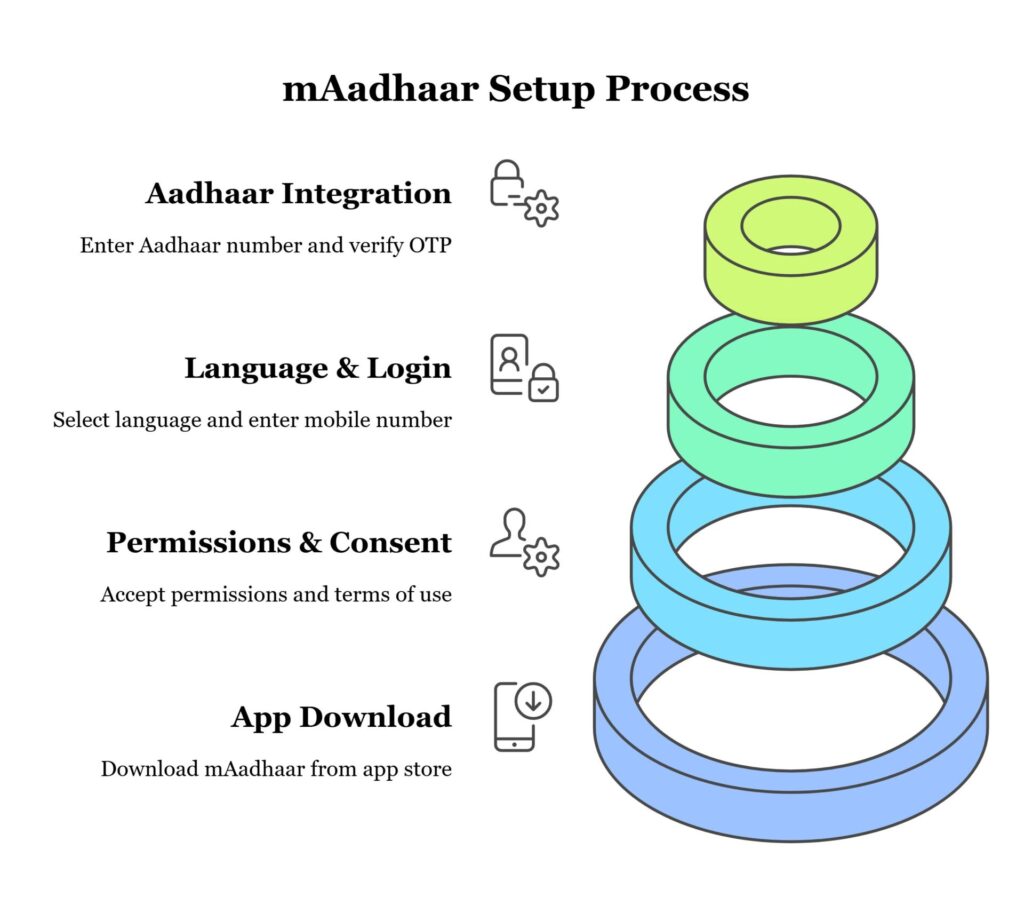
Completing the mAadhaar online download and setting up the application on your smartphone is extremely simple. All you need to do is follow the steps outlined below.
- Step 1: Visit the Google Play Store or the Apple App Store depending on whether you have an Android smartphone or an Apple device.
- Step 2: Search for the mAadhaar app.
- Step 3: Proceed to download the Aadhaar app and install it on your phone.
- Step 4: Once the mAadhaar download is complete, open the app on your phone.
- Step 5: Accept all permissions.
- Step 6: Read through the terms of use thoroughly and tap on ‘I Consent’.
- Step 7: Select your preferred language and tap ‘Continue’.
- Step 8: Enter your mobile number and tap ‘Next’.
- Step 9: Enter the OTP you received on your phone and tap ‘Submit’.
- Step 10: Once you are logged into the mAadhaar app, tap on the ‘My Aadhaar’ option at the bottom of the screen.
- Step 11: Create a 4-digit password of your choice. You will be asked to enter this password whenever you attempt to access the ‘My Aadhaar’ section of the app.
- Step 12: Enter your 12-digit Aadhaar number and the security Captcha in their respective fields and tap ‘Request OTP’.
- Step 13: Enter the OTP received on the mobile number linked to your Aadhaar and tap ‘Verify’.
Once the OTP is verified, you can access your Aadhaar details securely within the app.
Security Measures in mAadhaar
Considering that the Aadhaar is a highly confidential personal document, the UIDAI has implemented various security measures in the mAadhaar app. Here is an overview of some of the various security measures.
- Secure PIN Protection
The app requires you to enter a 4-digit password, which is created during the mAadhaar download and setup process, each time you log into the app. This ensures that only the registered user can access their Aadhaar details.
- Time-Based One-Time Password (TOTP) Generation
The mAadhaar app allows you to generate a Time-Based One-Time Password (TOTP). As the name implies, TOTP is valid only for 30 seconds and is an alternative to the regular OTP-based Aadhaar verification system.
- Biometrics Access Control
Using the mAadhaar app, you can quickly lock biometrics to prevent unauthorised use of the Aadhaar verification system. Additionally, if the need for Aadhaar-based authentication arises, you can instantly unlock biometrics within seconds through the app.
- Masked Aadhaar Download Option
The app allows you to download the Aadhaar card to your device. You can download either a regular Aadhaar or a masked Aadhaar. The masked Aadhaar option hides the first 8 digits of the Aadhaar number, revealing only the last 4 digits. This feature can be useful for verifying your identity without revealing your number.
Limitations and Considerations
Despite the many advantages of mAadhaar, the app has certain limitations that you must consider. Here are a few of its drawbacks.
- Requires a Smartphone
To access mAadhaar, you require a compatible smartphone with the right operating system version. Individuals with older smartphones or those with no access to a smartphone cannot use the app.
- Requires a Registered Mobile Number
To set up the mAadhaar app on your phone, you must enter the mobile number linked to your Aadhaar. If your mobile number is not registered or inactive, you must first update it at an Aadhaar Seva Kendra before attempting to use the app.
- Device-Specific Access
The app can be used only on one mobile device at a time. If installed on another phone, the user must re-verify their Aadhaar, which instantly deactivates it on their previous phone.
Conclusion
The mAadhaar app is a powerful digital tool designed to make Aadhaar services more accessible and convenient. Thanks to the secure authentication and digital Aadhaar verification features, the app is a viable and highly useful alternative to the physical card. However, before you proceed with the mAadhaar download and setup process, it is advisable to consider its limitations.
Frequently Asked Questions
1. How can one avoid entering the password repeatedly when opening the mAadhaar app?
For security and privacy reasons, the mAadhaar app does not support a save password feature. Users must enter their password each time they access their profile or My Aadhaar.
2. Does the mAadhaar app work differently on iOS and Android devices?
No, the mAadhaar app offers the same features and services on both iOS and Android. The user experience is consistent across platforms.
3. Can Aadhaar details like date of birth, mobile number, or address be updated through the mAadhaar app?
At present, the mAadhaar app does not allow users to update most demographic details, such as name, date of birth, or mobile number. Only address updates through document upload are supported. Other demographic update options may be added in future versions of the app.
4. What happens if I switch to another application during the Aadhaar linking process?
If you switch to another application while linking Aadhaar, the process will be interrupted, and you will need to start the entire linking process again.
Related Articles

MSME Need to Know About GST
A complete guide for MSMEs to understand GST regulations, compliance, benefits, and impact on small businesses.
Loan Restructuring: All You Need to Know
Understand the process, benefits, and eligibility criteria of loan restructuring to manage financial stress effectively.
Business Loan vs Lines of Credit: Everything You Need to Know
Compare business loans and lines of credit to choose the best financing option for your enterprise’s growth needs.